A secure local bridge that lets Windows, PHP, XAMPP and WSL2 applications submit plain-text email through a running Pegasus Mail client.
Pegasus Bridge lets applications on the same computer send email through your existing Pegasus Mail setup. It validates the message and passes it to Pegasus Mail, so individual applications do not need to store separate mail-server passwords.
Introductory price
€19 one-time
No subscription. For one user on one Windows computer. Includes 12 months of updates and email support.
Important: the actual sender is determined by the identity currently selected in Pegasus Mail. A successful response means Pegasus Mail accepted the message operation; it does not prove delivery to the recipient.
Product: Pegasus Bridge
Version: 1.0.3
Supported systems: 64-bit Windows 10 and Windows 11
Requires: Pegasus Mail for Windows
Included integrations: Windows PowerShell, PHP, XAMPP and WSL2
Message format: plain text in Unicode, including Cyrillic and Latin text
Price: €19 one-time
License: one user on one Windows computer
How it works
Pegasus Bridge runs in the background while you are signed in to Windows. It must run under the same Windows user and in the same interactive session as Pegasus Mail.
A local application submits the sender address, recipients, subject and text over an authenticated local HTTP API. Pegasus Bridge validates the data and passes the message to Pegasus Mail through its DDE interface. It is not an SMTP server and does not replace Pegasus Mail.
What you get
An authenticated bridge for applications on the same computer
Ready-to-use Windows PowerShell, PHP, XAMPP and WSL2 clients
Automatic startup when you sign in to Windows
Optional WSL2 and XAMPP integration
English and Bulgarian local documentation
A support-bundle tool that excludes the access token and message content
Message data
Each message contains a sender address, one or more recipients, a subject and plain-text content. An optional Reply-To address can be supplied; otherwise the sender address is used as Reply-To.
Version 1.0.3 does not support HTML, attachments, CC/BCC, custom headers or selecting a Pegasus Mail identity from the calling application.
Architecture and diagrams
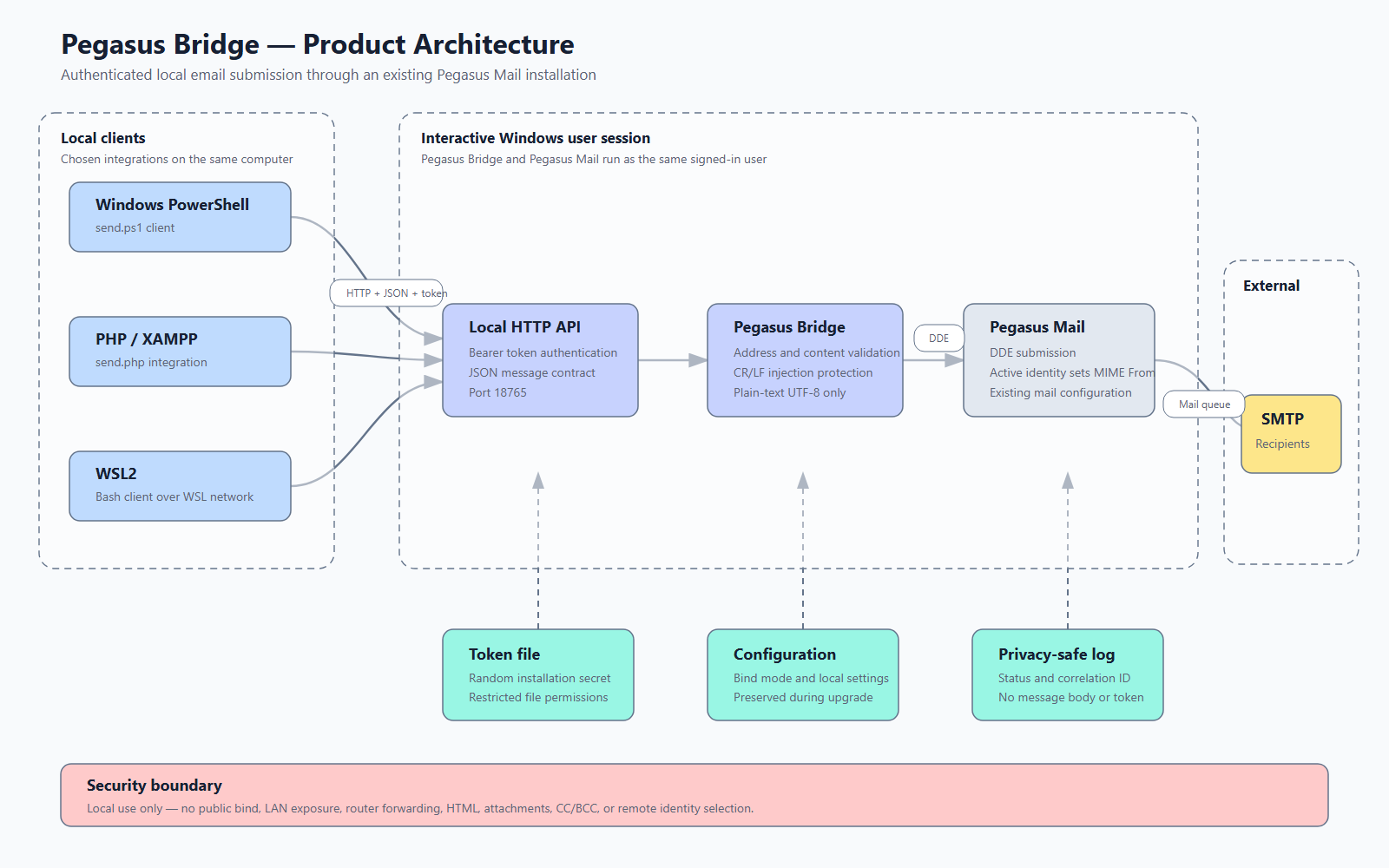
The diagram shows how the Windows PowerShell, PHP/XAMPP and WSL2 clients connect to the authenticated local API, how Pegasus Bridge validates the request and how the message is submitted to Pegasus Mail.
Pegasus Bridge architecture and security boundaries
Requirements
64-bit Windows 10 or Windows 11
Pegasus Mail for Windows
Administrator rights during installation
Pegasus Mail and Pegasus Bridge running as the same signed-in Windows user
WSL2 only when applications inside WSL2 need access
XAMPP only when local PHP applications use XAMPP
Select the WSL2 and XAMPP components only when you actually need them.
Installation
Download the installer only from the official page or the address supplied after purchase.
Compare its SHA-256 checksum with the published value. Version 1.0.3 is unsigned, so Windows may display a warning.
Run the installer with administrator rights.
Confirm the main Pegasus Mail directory. It must contain Programswinpm-32.exe.
Keep Loopback only for ordinary Windows use. Select WSL2 or XAMPP only if required.
Finish installation, start Pegasus Mail and select the sender identity you want to use.
Run the health check to confirm that the connection is ready.
Installation creates a random Bearer access token. It is stored only on the computer and authenticates requests to Pegasus Bridge. Repair and upgrade preserve the existing configuration and token.
Usage
Before sending, start Pegasus Mail, select the identity that should be the actual sender, and make sure Pegasus Bridge is running in the same Windows user session.
A ready response contains "ok": true and "status": "ready". pegasus_unavailable usually means Pegasus Mail is not running or is in a different Windows session.
Select the XAMPP component during installation or Modify when Apache/PHP runs as LocalSystem. The installer exposes a protected path to the Bearer access-token file through PEGASUS_BRIDGE_TOKEN_FILE. By default it is stored at C:\PMAIL\Pegasus Bridge\runtime\token.txt. Treat it as a password; never copy it into PHP or WordPress code, a database, the web root, a page, log or exception.
The WSL2 component must be enabled during installation or Modify. The client discovers the Windows gateway through ip route show default. Do not store the token in source code, shell history or a publicly readable environment file.
Fields and response
from, to, subject and text are required.
replyTo is optional and defaults to from.
from does not change the actual MIME From; the active Pegasus Mail identity determines it.
HTTP 202 accepted_by_pegasus means Pegasus Mail accepted the operation, not that delivery is complete.
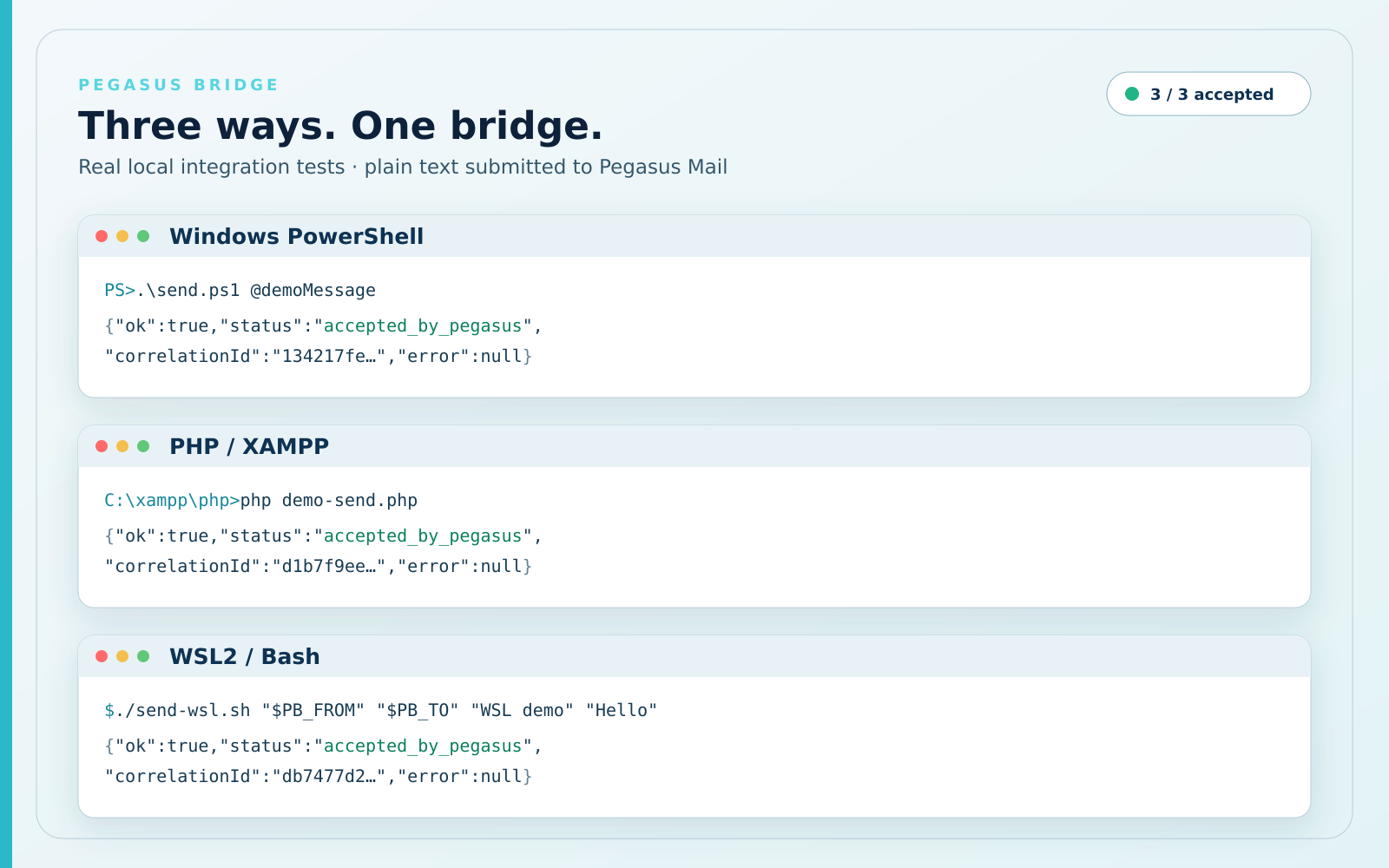
Three supported ways to use Pegasus Bridge — real successful PowerShell, PHP/XAMPP and WSL2 tests
Security
The bridge is intended only for applications on the same computer.
Every send request requires the Bearer token generated during installation.
WSL2 access is limited to the necessary private virtual network.
XAMPP receives permission to read only the access-token file.
Addresses and the subject are validated before acceptance.
Logs exclude recipients, subject, message text and access token.
Support bundles exclude the token, messages and Pegasus Mail mailbox.
Do not expose the bridge to other computers or the internet. It is designed only for controlled local use.
Updates and removal
Update
Run the newer installer over the existing version. Your configuration and access token are preserved.
Uninstall
Use Windows Settings → Apps → Installed apps → Pegasus Bridge → Uninstall. You can choose whether to retain runtime settings for a future installation. Full removal deletes the files and firewall rules created by Pegasus Bridge.
Testing
Version 1.0.3 has been tested with Windows, WSL2 and XAMPP, including clean installation, upgrade, uninstall and submission of Unicode messages.
A successful submission means Pegasus Mail accepted the operation. Delivery depends on Pegasus Mail, your mail provider and the recipient's server.
License, updates and support
License
One purchase licenses one user on one Windows computer.
Personal and business use are allowed.
You may move the product to a new computer after discontinuing use on the old one.
Separate purchases are required for additional users or computers.
The installer may not be published, resold or supplied to other people.
No online activation or tracking
The product does not verify your purchase online, bind itself to hardware or track usage.
14-day money-back guarantee
You may request a full refund within 14 calendar days of the purchase date by emailing PegasusBridge@krumch.com and including your order email or order reference.
We strongly encourage you to tell us what did not meet your needs. Your reason helps us improve the product or offer a solution, but it is optional and will not delay or prevent the refund.
We will initiate the refund within 5 business days. The time needed for the funds to appear in your account depends on the payment provider and your bank. After the refund, the license terminates and you must uninstall Pegasus Bridge and delete any saved copies of the installer.
The voluntary guarantee may be refused in cases of proven fraud, repeated refund abuse, sharing or resale of the product, or a chargeback filed after the payment has already been refunded. This does not limit any mandatory rights you have under applicable law.
Updates and support
The purchase includes 12 months of updates and email support. The version you received continues to work after that period.
No. Pegasus Bridge submits messages to a running, configured Pegasus Mail client.
Can the application select the sender identity?
No. The active identity in Pegasus Mail determines the actual sender.
Are HTML and attachments supported?
No. Version 1.0.3 supports plain text only and no attachments.
Can it run without a signed-in user?
No. Pegasus Bridge and Pegasus Mail must run in the same interactive Windows user session.
What does “accepted” mean?
Pegasus Mail accepted the validated operation for sending. This is not proof of delivery.
Is online activation required?
No. There is no activation server or usage tracking.
How do I request a refund?
Email PegasusBridge@krumch.com within 14 calendar days of purchase and include your order email or reference. A reason is strongly encouraged but optional.
Price and purchase
Before you buy
Review the Requirements section. You need 64-bit Windows 10 or Windows 11 and Pegasus Mail for Windows. WSL2 and XAMPP are required only for those optional integrations.
Windows warning: version 1.0.3 is not digitally signed.
the right to continue using the version received after those 12 months expire
14-day money-back guarantee
Email PegasusBridge@krumch.com within 14 calendar days of purchase. A reason is strongly encouraged but optional. We will initiate the refund within 5 business days. After a refund, the license terminates and the product and saved installer copies must be uninstalled and deleted.

 Pegasus Bridge